Where Americans Watch Free Movies and TV Shows on Smart TVs

 |
| Free and Legal Ways Americans Watch Movies on Smart TVs |
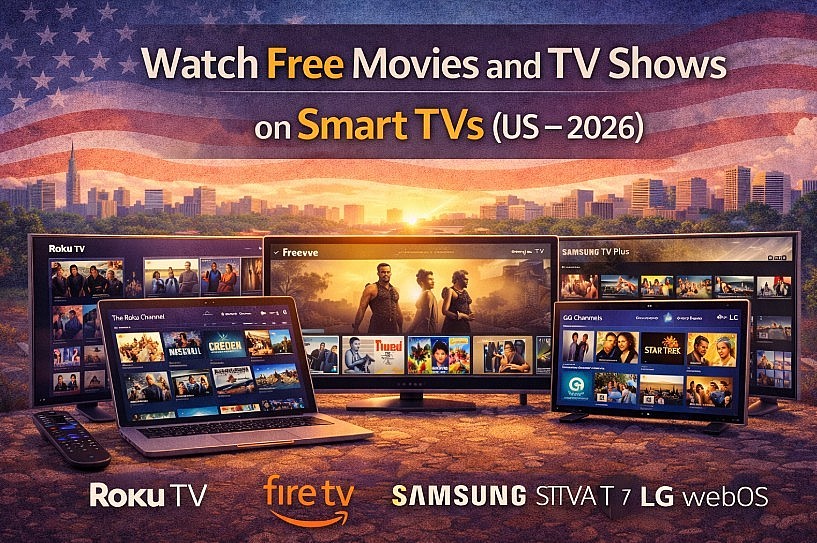
In 2026, many Americans don’t watch “free streaming” on laptops anymore. They watch it on Smart TVs and streaming sticks—especially Roku TVs, Amazon Fire TV, Samsung Smart TVs, LG webOS TVs, and Android/Google TV. The experience is simple: open an app, pick a channel or a title, and watch with ads.
Why Smart TVs Are the Center of Free Streaming in the US
Free Smart TV streaming is built on the FAST model (Free Ad-Supported Streaming TV): platforms license content and fund it with ads, so you don’t need a subscription. On most TVs, these services are either preinstalled (Samsung TV Plus, LG Channels, The Roku Channel) or one search away in the app store.
Roku TVs & Roku Devices
Roku remains one of the most “free-first” TV platforms in the US, with strong support for both live channels and on-demand libraries.
Where Roku users watch free content (official links)
-
The Roku Channel (hub page): https://www.roku.com/whats-on/the-roku-channel
-
The Roku Channel (Free Movies & TV on web): https://therokuchannel.roku.com/browse/free-movies-and-tv
-
Pluto TV: https://pluto.tv
-
Tubi: https://tubitv.com
How to watch on Roku (step-by-step)
-
Press Home on the remote
-
Open Streaming Store / Channel Store
-
Search and install: The Roku Channel, Pluto TV, Tubi
-
Open the app → choose Live TV (channels) or Movies/TV (on-demand)
Tip (real-world): If your goal is “turn on the TV and something is always on,” start with The Roku Channel + Pluto TV (strong live channel experience).
Read more: How To Download Popcorn Time on iPhone, Smart TV, Laptop and Android
Amazon Fire TV (Fire TV Stick, Fire TV TVs)
Fire TV is extremely popular in the US, especially in Prime households, but you can still watch a lot of free content without subscribing.
Where Fire TV users watch free content (official links)
-
Prime Video’s Freevee (official): https://www.amazon.com/gp/video/splash/freevee_findus
-
Freevee storefront (Free with ads): https://www.amazon.com/gp/video/storefront/subscription/freewithads
-
Pluto TV: https://pluto.tv
-
Tubi: https://tubitv.com
Fire TV’s free experience has been expanding through its Live Guide aggregation. Recent coverage notes Amazon added more free channels (including Roku Channel content) into Fire TV’s Live Guide experience.
How to watch on Fire TV (step-by-step)
-
From the home screen, go to Find / Search
-
Search: Freevee, Pluto TV, Tubi → select Download / Get
-
For channel-style viewing: open Live / Live Guide (label varies by device)
-
Pin your free apps: highlight the app → Options → Move (so they stay in the first row)
Tip (real-world): For a polished “TV + movies” mix, Freevee + Pluto TV is a strong combo on Fire TV.
Read more:
- 5 Best Free Websites to Download Movies Legally in the US (Latest Guide)
- A Ultimate Guide to Downloading Movies and TV Series from Netflix for Offline Viewing
Samsung Smart TVs (Tizen OS)
Samsung’s free ecosystem is anchored by Samsung TV Plus, which is positioned as an always-on, no-cost TV experience.
Where Samsung users watch free content (official links)
-
Samsung TV Plus (main): https://www.samsungtvplus.com/
-
Samsung TV Plus (Samsung US page): https://www.samsung.com/us/tvs/smart-tv/samsung-tv-plus/
-
Optional add-ons (via Samsung app store): Pluto TV, Tubi
Samsung states Samsung TV Plus is 100% free, with live channels and on-demand content.
How to watch on Samsung TV (step-by-step)
-
Turn on the TV → open Samsung TV Plus (often preinstalled and easy to find)
-
Use Guide to browse what’s on now/next
-
Use CH up/down to switch channels quickly (traditional-TV feel)
-
For more on-demand libraries, install extra apps from Apps (Samsung store)
Tip (real-world): Samsung TV Plus is ideal for households that miss cable-style channel surfing.
LG Smart TVs (webOS)
LG’s built-in free experience is centered on LG Channels, plus a large app ecosystem through webOS.
Where LG users watch free content (official links)
-
LG Channels (LG USA): https://www.lg.com/us/webos/lg-channels
-
LG Channels (web): https://lgchannels.com/
-
Optional add-ons (via LG Content Store): Pluto TV, Tubi
LG highlights 300+ LG Channels and also mentions on-demand movies and TV series (availability may vary by region/device).
How to watch on LG webOS (step-by-step)
-
Press Home → open LG Channels (often built-in)
-
Browse Live channels or discover on-demand sections (if available)
-
Open LG Content Store → install Pluto TV / Tubi if you want bigger on-demand libraries
Tip (real-world): LG Channels is great for “background TV” (news, lifestyle, kids), while Tubi is better for picking a movie on demand.
Read more: How to Download Movies Legally for Free to Watch Offline
Android TV & Google TV (Sony, TCL, Hisense, Chromecast)
Android/Google TV tends to be the most flexible because it’s app-driven and easy to customize.
Where Android/Google TV users watch free content (official links)
-
Tubi: https://tubitv.com
-
Pluto TV: https://pluto.tv
-
PBS: https://www.pbs.org
How to watch on Android/Google TV (step-by-step)
-
Open Google Play Store
-
Search and install: Tubi, Pluto TV, PBS
-
Add to favorites or move apps to the first row for quick access
-
Use voice search (“free action movies”, “crime shows”) to browse faster
Tip (real-world): Android/Google TV is best if you like customizing your home screen and stacking multiple free apps.
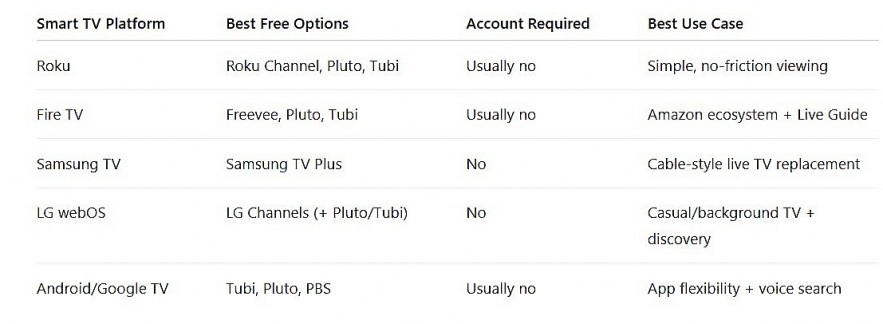
Comparison Table: Best Free Streaming by Smart TV Platform
 |
| Best Free Streaming by Smart TV Platform |
What Americans Expect From Free Smart TV Streaming
Normal (and legal):
-
Ads every ~10–20 minutes
-
Rotating catalogs (titles come and go)
-
Mix of older hits, classics, and niche content
Not realistic for legal “free”:
-
Brand-new blockbusters on-demand
-
Offline downloads on TV
-
Completely ad-free streaming of licensed studio films
Final Recommendation
-
Want the smoothest “free-first” experience? Roku TV + The Roku Channel
-
Want Amazon-style discovery + a polished free library? Fire TV + Freevee
-
Want cable replacement without subscriptions? Samsung TV Plus
-
Want built-in free channels + a strong TV OS? LG Channels on webOS
Most American households get the best results by installing two or three apps, not relying on only one.
FAQs
1) Is it legal to watch movies and TV shows for free on a Smart TV in the US?
Yes—if you use legitimate services that license content and fund streaming with ads (like The Roku Channel, Freevee, Samsung TV Plus, or LG Channels).
2) Do I need an account to watch free streaming apps on Smart TVs?
Often, no. Many FAST services let you start watching immediately. Accounts are usually optional for features like watchlists, continue-watching, or personalization.
3) Why do free streaming apps show so many ads?
Ads are what pay for licensing and keep the service free. In practice, this replaces subscription fees with short ad breaks.
4) Which Smart TV platform is best for free movies and shows?
Roku is typically the most “free-first” overall, while Samsung and LG are strong if you prefer built-in live channels. The best choice depends on whether you prefer live channels or on-demand libraries.
5) What are red flags that a “free movie” app is unsafe or illegal?
Avoid apps that require installing extensions, redirect you repeatedly, request unusual permissions, or claim “new releases for free.” Stick to official TV app stores and well-known services.
6) Can I watch these free services in 4K?
Some free services offer select 4K channels or titles depending on the device and the service. Availability varies by platform and content.